Azure Cosmos DB
Steps and required credentials to connect Azure Cosmos DB to Squadbase
Required Information
| Field | Description |
|---|---|
| Cosmos DB Endpoint | The Cosmos DB account endpoint URL (e.g., https://<account>.documents.azure.com:443/). |
| Account Key | The Cosmos DB account key (primary or secondary). Use a read-only key when only querying data. |
| Database | The name of the Cosmos DB database to connect to. |
How to Obtain Each Value
Cosmos DB Endpoint / Account Key
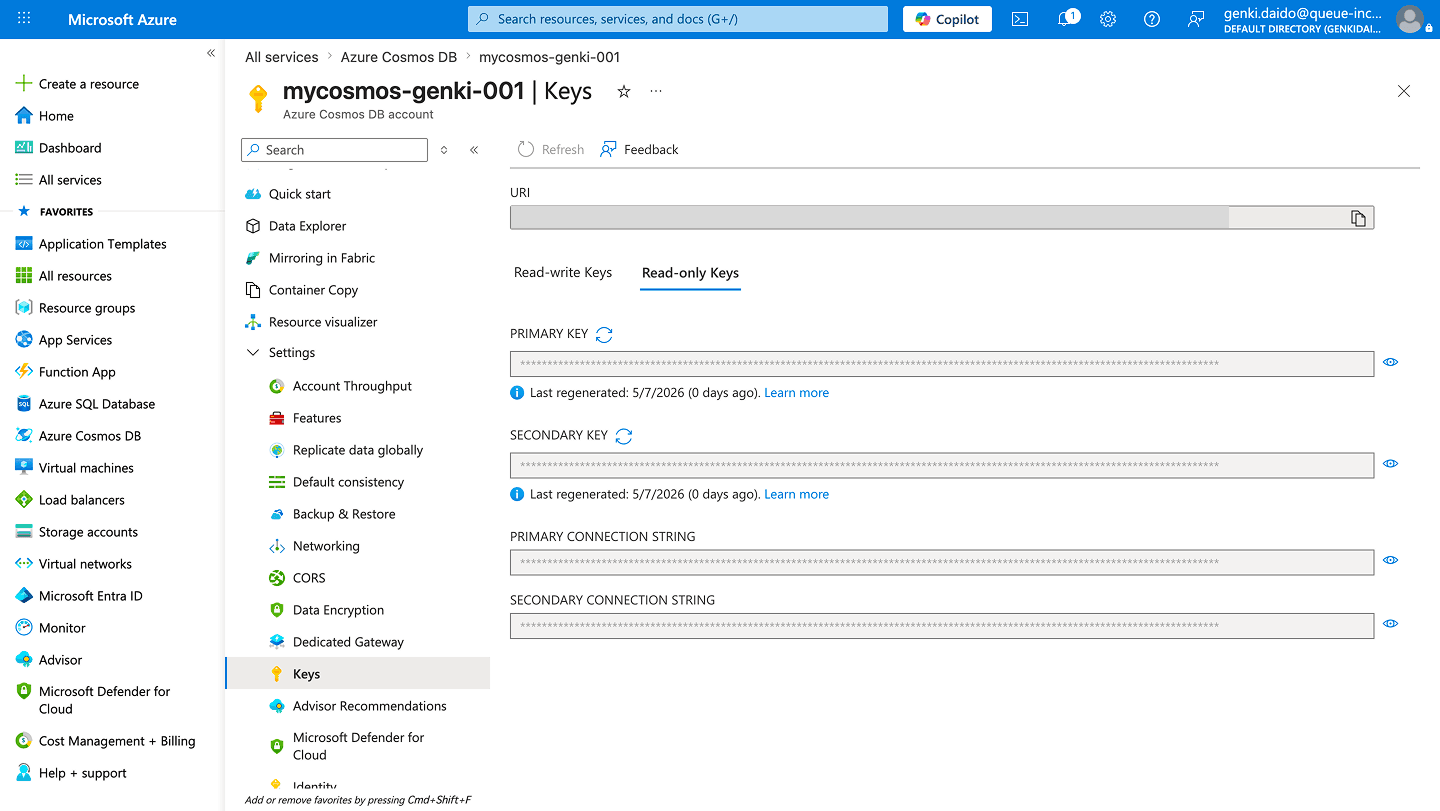
Both values are found under Settings → Keys in your Cosmos DB account.
- Log in to the Azure Portal
- Navigate to your Cosmos DB account
- Select Keys under Settings in the left sidebar
- Copy the URI as the Cosmos DB Endpoint
- Open the Read-only Keys tab and copy the PRIMARY KEY as the Account Key (use the Read-write Keys tab if write access is needed)
Database
The database name is visible in the Data Explorer of your Cosmos DB account in the Azure Portal.
- Navigate to your Cosmos DB account in the Azure Portal
- Select Data Explorer from the left sidebar
- The database names are listed in the left panel