Nov 9
Let AI Tell You What Changed in Your Data

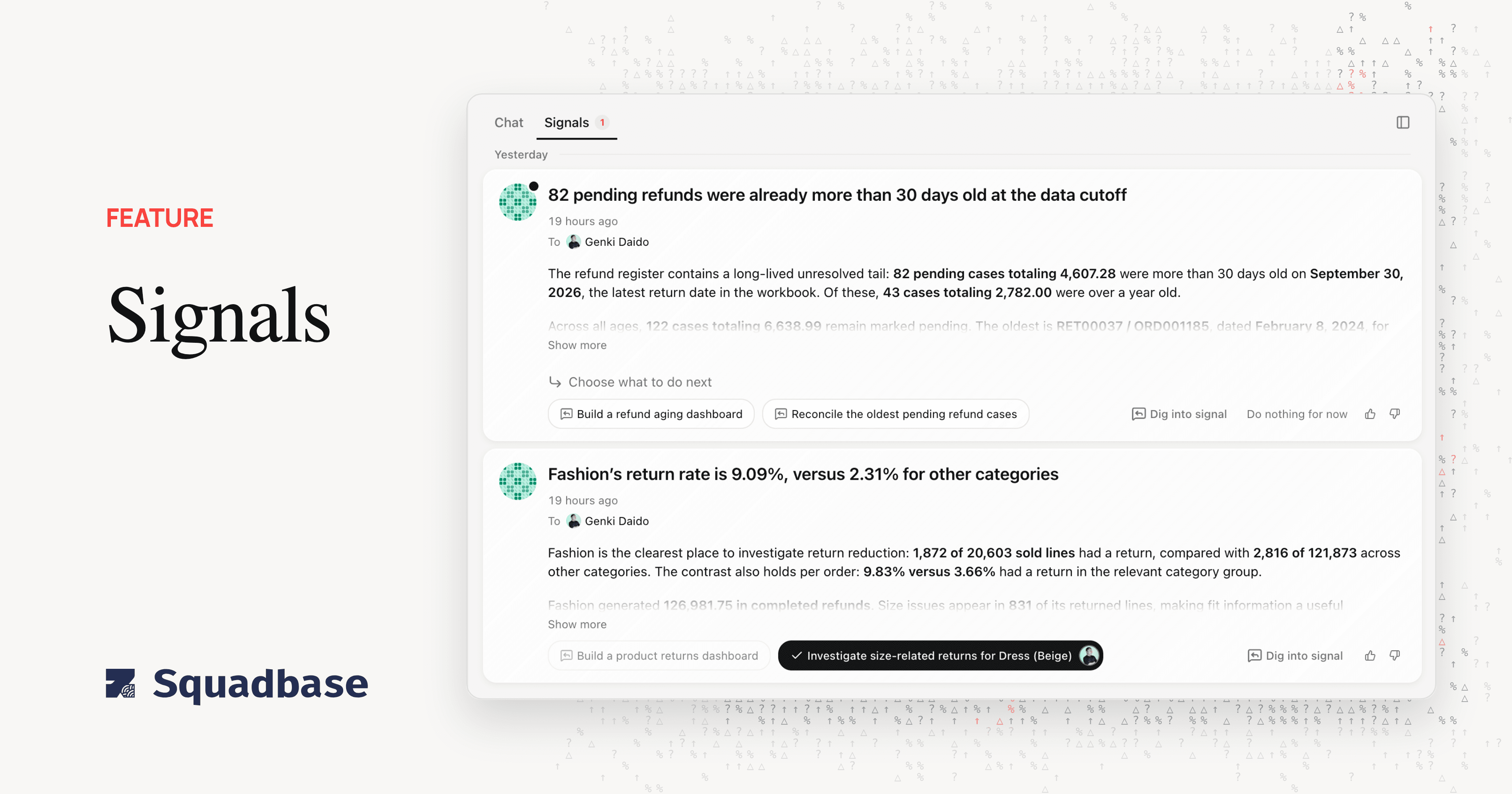
We've released Signals. The Squadbase agent now looks through your project's data, finds things your team hasn't noticed yet, and sends them to you as signals.
Until now, your data only told you something when you asked. Asking got easier with AI, but someone still had to decide what to look at, open the dashboards, and compare the numbers with the last time they checked. Why that job should move to the data side is laid out in Beyond "Ask Your Data": When Data Speaks First, published in August. Signals is the first part of Squadbase built on that idea.
What does a signal tell you?
A signal is a message from the agent about something it found in your data. It leads with the conclusion and, when it helps, shows the chart or table behind it, so you can check the numbers before you act on them. A signal can tell you, for example:
- A fact or trend in your data, and why it is happening
- Actions that could move a metric
- How the numbers changed after something your team tried
- A new way to use data you already have
When it makes sense, a signal also suggests building something: a dashboard to keep watching the number, slides to share it, or an automation to check it on a schedule.
Where do signals show up?
Signals arrive in two places. In each project's editor, they have their own tab next to Chat, with a count of new signals, so they never interrupt a conversation you're having with the agent. On Home, you see the signals from every project you have access to, in one list.
Each signal is addressed to a member of your team. Home also shows what your team decided about each signal: who replied, and how. When two people look at the same change in the data, neither has to ask the other whether it's been handled.
What happens when you reply?
Every signal comes with suggested replies under "Choose what to do next." Pick one and the project the signal came from opens, and the agent starts a new thread that continues from what it already looked into. You don't have to restate the question or point it at the data again.
If you want to look closer before deciding, choose Dig into signal. If nothing needs to happen yet, choose Do nothing for now. That is a decision too, and it's recorded on Home like any other reply.
What do signals leave to you?
Signals find and suggest. They don't act on their own. The agent doesn't build a dashboard, change an automation, or send anything to anyone until someone on your team picks a reply. We drew the line there on purpose: the agent is good at noticing that a number moved, but whether that change matters this week is a call your team makes.
Signals also don't replace the ways you already work. Chat in the editor works the same as before, and your automations keep running on their schedules.