Claude Code vs. Gemini CLI vs. Codex CLI: What’s the Best Choice for Internal Tool Development? (2025 Summer Edition)

In 2025, building in-house tools with coding agents is spreading rapidly. Compared with off-the-shelf SaaS, you can spin up tools tailored to your company's workflows in a short time.
One category drawing particular attention is CLI-based AI tools that let you generate, edit, and run code from the terminal using natural language. The three main options are Claude Code, Gemini CLI, and Codex CLI. Which should you choose?
However, these CLI tools require a local development environment setup—you need Git, a code editor, and command-line proficiency to get started. For teams where not everyone is comfortable with terminal-based workflows, this can be a significant barrier.
This article offers a practical comparison to help you pick the best option for your environment—and introduces a setup-free alternative.
Why CLI-Based AI Tools?
Managing Context
To control AI behavior and improve the accuracy of the desired outputs, you must manage the information (context) you provide to the AI.
CLIs operate under the premise that "the repository is the world," so the tool reasons based on the code and documents under your project directory. Claude Code automatically reads CLAUDE.md at the project root (and, if needed, multiple files in a hierarchy) and treats "what and how to build in this project" as strict rules. Because this works like a "system instruction" stronger than regular conversation, it boosts output consistency.
Gemini CLI lets you provide similar project context via GEMINI.md. Its README also explains the mechanism for "custom context files." Codex CLI recommends injecting context with AGENTS.md or codex.md, reflecting local instructions directly in its behavior.
Long-Term Memory via Saved Files
Chat-style AI tools primarily rely on thread history for long-term memory, but CLI-based tools can load local files whenever needed. This makes it easier to leverage past work for future tasks. By organizing and saving the information you want the AI to remember long-term, you can retain it more effectively.
Compared with thread-based tools, users can more easily participate in curating the AI's long-term memory.
Leveraging Other CLI Tools and MCP Servers
Chat-style AI tools run on the provider's servers, which can make integrations with external tools difficult; what you can connect to often depends on provider-supplied connectors.
CLI-based AI tools, on the other hand, run locally and therefore integrate more easily with existing CLI commands and MCP servers. For example, you can tap MCP servers like Playwright for browser automation or MarkItDown, which converts PDFs and PPTX files into AI-friendly Markdown. This makes it easier to extend your AI's capabilities.
Claude Code: The Most Mature, Production-Grade Option
Claude Code is Anthropic's CLI-based AI tool. As a pioneer in this space, it stands out for its high customizability and a mature community.
Model Strengths
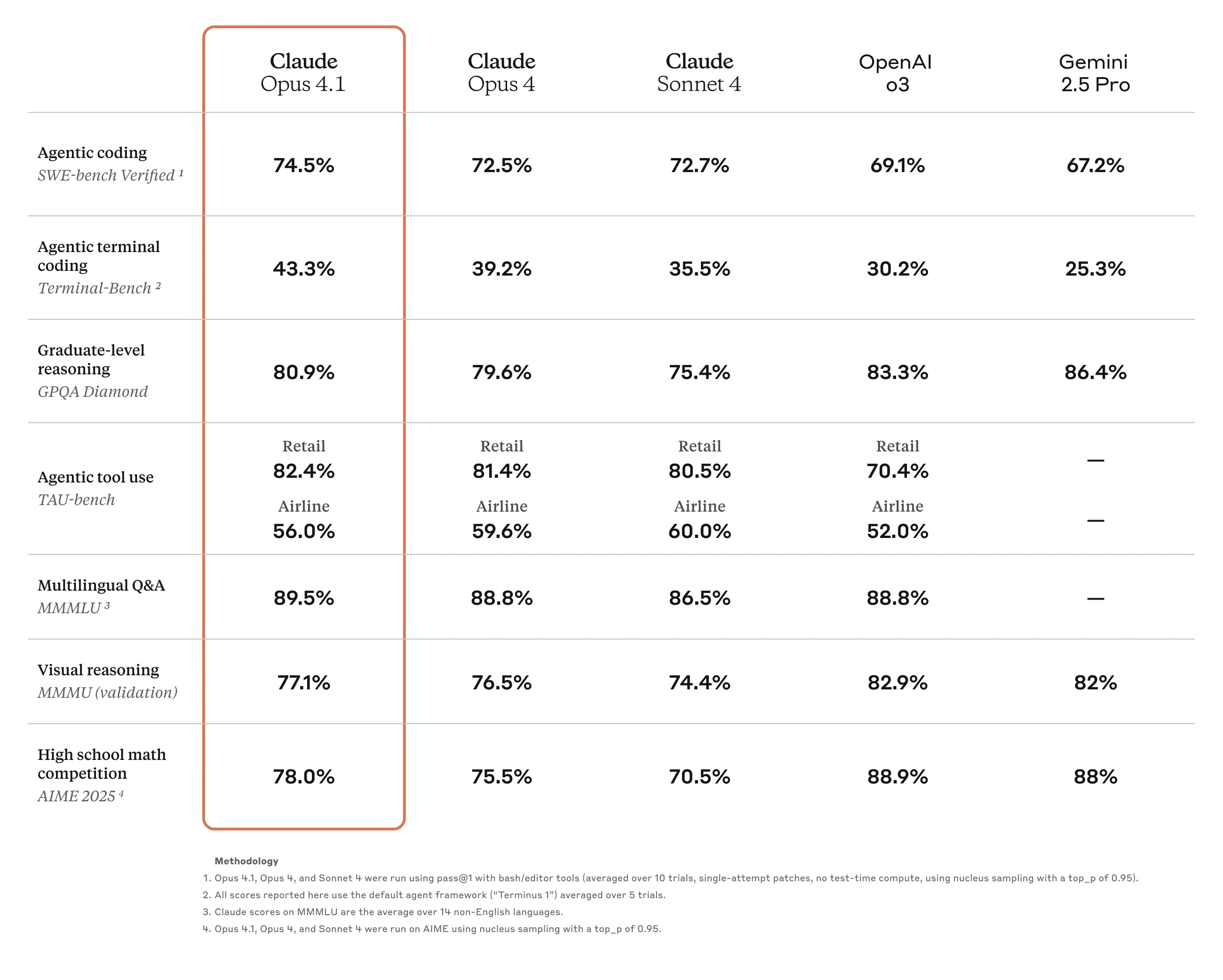
Claude Code primarily uses "Claude 4.1 Opus" and "Claude 4.0 Sonnet." These models achieve high scores on coding benchmarks, and in practice you'll likely find their accuracy impressive.
Custom Slash Commands
In Claude Code, you can create custom commands by writing Markdown files under the .claude/commands directory. These commands can be invoked during a chat with Claude Code to automate repetitive tasks. You can also push the commands to GitHub and share them with your team.
You can discover useful community commands in public repositories such as Awesome Claude Code.
Subagents
Claude Code lets you create subagents by writing Markdown files under .claude/agents/. You can call these subagents during a chat to split and handle complex tasks. As with commands, you can push them to GitHub for team sharing.
Unlike custom slash commands, subagents maintain context independent of the main conversation. They're handy when you don't want to pollute the main thread's context or when you want to handle a large, separate context. For example, if you have a repetitive, purpose-specific task whose details don't need to be fed back into the main conversation, a subagent is ideal.
MCP Server Integrations
Claude Code can integrate with external tools via MCP servers. You can find useful MCP servers in public repos such as Awesome MCP Servers.
It also provides management commands for MCP servers and clearly explains how to scope their usage. See the official docs for details.
Gemini CLI: Speed, Google Search, and a Generous Free Tier
Gemini CLI is Google's CLI-based AI tool. Its strengths include integration with Google services and the cost-effectiveness of Gemini models.
Model Strengths
The main models used with Gemini CLI are "Gemini 2.5 Pro" and "Gemini 2.5 Flash." The Gemini 2.5 series is known for fast responses, and the generous free tier is another advantage.
You can also use grounding integrated with Google's search services, making it an excellent choice if you often need to perform web searches and fact-checking.
MCP Server Integrations
Gemini CLI also supports integrations with MCP servers.
Codex CLI: OpenAI-Made, With Room to Grow
Codex CLI is OpenAI's CLI-based AI tool. Its strength is access to OpenAI models.
Model Strengths
The main model used with Codex CLI is "GPT-5." A key characteristic is its automatic "routing": it decides how to behave internally based on user instructions—handling tasks that require complex reasoning thoroughly while responding quickly to simple tasks. That said, compared with Claude Code or Gemini CLI, you may not always feel a clear accuracy advantage at this point.
As an industry leader, OpenAI ships model updates rapidly, and Codex CLI can take advantage of those quickly—another reason there's a lot to look forward to.
MCP Server Integrations
Codex CLI also supports MCP server integrations.
Deploying the Apps You Build—and a Simpler Alternative
The CLI Approach: Powerful but with Prerequisites
Combining starter templates with an AI CLI tool enables you to build sophisticated internal tools. However, this workflow has inherent requirements:
- Local environment setup: You need Node.js, Python, or other runtimes installed and configured
- Git and CLI proficiency: Cloning repos, running commands, and managing dependencies are table stakes
- Separate deployment step: Once built, you still need a platform to host and share your app securely
For experienced developers, these are minor hurdles. But for teams with mixed technical backgrounds—or for non-engineers who want to build their own tools—this workflow can feel out of reach.
Squadbase: Build and Deploy Without Leaving the Browser
What if you could skip the local setup entirely?
Squadbase is evolving into a browser-based vibe-coding platform where you can build and deploy internal tools without ever touching a terminal. Here's what that means:
- Browser-based IDE + AI chat: Write code (or describe what you want in natural language) directly in your browser. The integrated AI assistant helps you build, just like CLI tools do—but without any local setup.
- Built for data dashboards: Squadbase excels at building data dashboards. Connect to your internal databases and APIs, then build real-time dashboards using natural language instructions. No SQL or charting library expertise required—just describe the dashboard you want and watch it come to life.
- No environment to configure: No Node.js installation, no Git commands, no dependency management. If you have a browser, you're ready to build.
- One-click deployment: When your app is ready, deploy it instantly. Your team can start using it right away.
- Built-in security for internal tools: Authentication, role-based access control, and audit logs come standard—because internal tools need enterprise-grade security.
For teams already comfortable with CLI workflows, Squadbase also supports Git-integrated deployment. Build locally with Claude Code, Gemini CLI, or Codex CLI, then push to GitHub and deploy to Squadbase for secure team access.
Final Thoughts
In the 2025 AI-powered development landscape, CLI tools like Claude Code, Gemini CLI, and Codex CLI offer powerful capabilities for building internal tools:
- Claude Code is the most mature option, with rich customization, strong coding accuracy, and production-quality output
- Gemini CLI shines when budget matters or when you need tight Google Search integration
- Codex CLI is promising as GPT-5 continues to evolve
But there's an easier path. If your team includes non-engineers, or if you simply want to skip the setup friction, Squadbase lets you build and deploy internal tools entirely in the browser—with the same AI-powered experience, minus the prerequisites. For data dashboards in particular, you can build them with natural language alone—no SQL or charting libraries required.
| Your situation | Recommended approach |
|---|---|
| Comfortable with CLI & Git | Use Claude Code/Gemini CLI/Codex CLI locally, deploy to Squadbase |
| Want to build data dashboards | Build directly on Squadbase using natural language |
| Want zero setup | Build and deploy directly on Squadbase |
| Mixed team (engineers + non-engineers) | Squadbase for everyone, CLI tools for power users |
Ready to build your first data dashboard? Try Squadbase free and go from idea to deployed dashboard in minutes—no terminal required.