3 Best AI Powered BI Tools for Snowflake in 2026

SQL Is No Longer the Only Way
Snowflake has grown far beyond its origins as a cloud data warehouse. Today, Snowflake brands itself as the Snowflake AI Data Cloud. This shift changes how teams work with data.
In the past, getting answers from data meant one thing: write SQL. You needed someone who knew the syntax. You needed someone who understood the schema. That bottleneck slowed down every data-driven decision.
Business users had to wait for analysts. Analysts had to wait for data engineers. Everyone waited for someone else.
The data existed, but accessing it took too long. Teams couldn't make informed decisions because the answers came too slowly.
Now, AI powered BI removes that barrier. Anyone can ask questions in plain language. Teams can make faster decisions without learning complex tools.
But here's the catch: not all AI tools work the same way. They differ in one key question: who controls the process?
This Snowflake AI tools comparison covers three AI powered BI tools that connect to your Snowflake data:
- Squadbase - Vibe Coding style
- Snowflake Intelligence - AI Chat style
- Sigma Computing - Co-pilot style
These three paradigms already shape how we use AI in other fields. Vibe Coding emerged from tools like Replit and Lovable. ChatGPT popularized AI Chat. GitHub Copilot defined the co-pilot pattern.
Now these same patterns are coming to Business Intelligence. Let's break down what makes each AI powered BI tool unique.
Three Paradigms of AI-Powered BI
Before diving into each tool, let's understand the three paradigms at play. You likely know these patterns from other AI tools. The same ideas now apply to Business Intelligence.
Vibe Coding BI: "Build what I describe"
Andrej Karpathy coined this term in early 2025. Tools like Replit and Lovable brought it to life.
You describe what you want in plain language. AI builds the complete solution. You refine through conversation.
For AI dashboards, this means describing what you want and watching AI create it. "Show me sales by region with monthly trends." Done. Share it with a link.
The tradeoff? Less granular control over every detail. You guide direction, not every pixel.
AI Chat: "Give me the answer now"
You know this pattern from ChatGPT. Type a question. Get an answer. Simple and direct.
For AI chat data analysis, this means asking "What were last month's sales?" and getting the number back. No setup. No building. Just answers.
The tradeoff? Less transparency. You trust the AI to interpret your question correctly.
Co-pilot: "Help me do this better"
GitHub Copilot made this pattern famous. AI works alongside you. It suggests. You decide. You stay in control.
For reports, this means AI helps write formulas or build charts. But you see every step. You can edit, adjust, or reject what AI creates.
The tradeoff? More effort required. You must engage with the process, not just consume results.
BI Tool Comparison
| Aspect | Squadbase | Snowflake Intelligence | Sigma Computing |
|---|---|---|---|
| Paradigm | Vibe Coding | AI Chat | Co-pilot |
| Output | Shareable dashboards | Text answers, charts | Editable workbooks |
| Persistence | Saved, always fresh | Ephemeral (ask each time) | Saved, always fresh |
| Sharing | Invite team members | Within Snowflake only | Invite team members |
| Setup | Low: Connect and start | High: Semantic views required | Medium: Connect and learn UI |
| Best For | Fast dashboard building | Team-wide chat agents | Deep, auditable insights |
Squadbase - Vibe Coding for Dashboards
What It Is
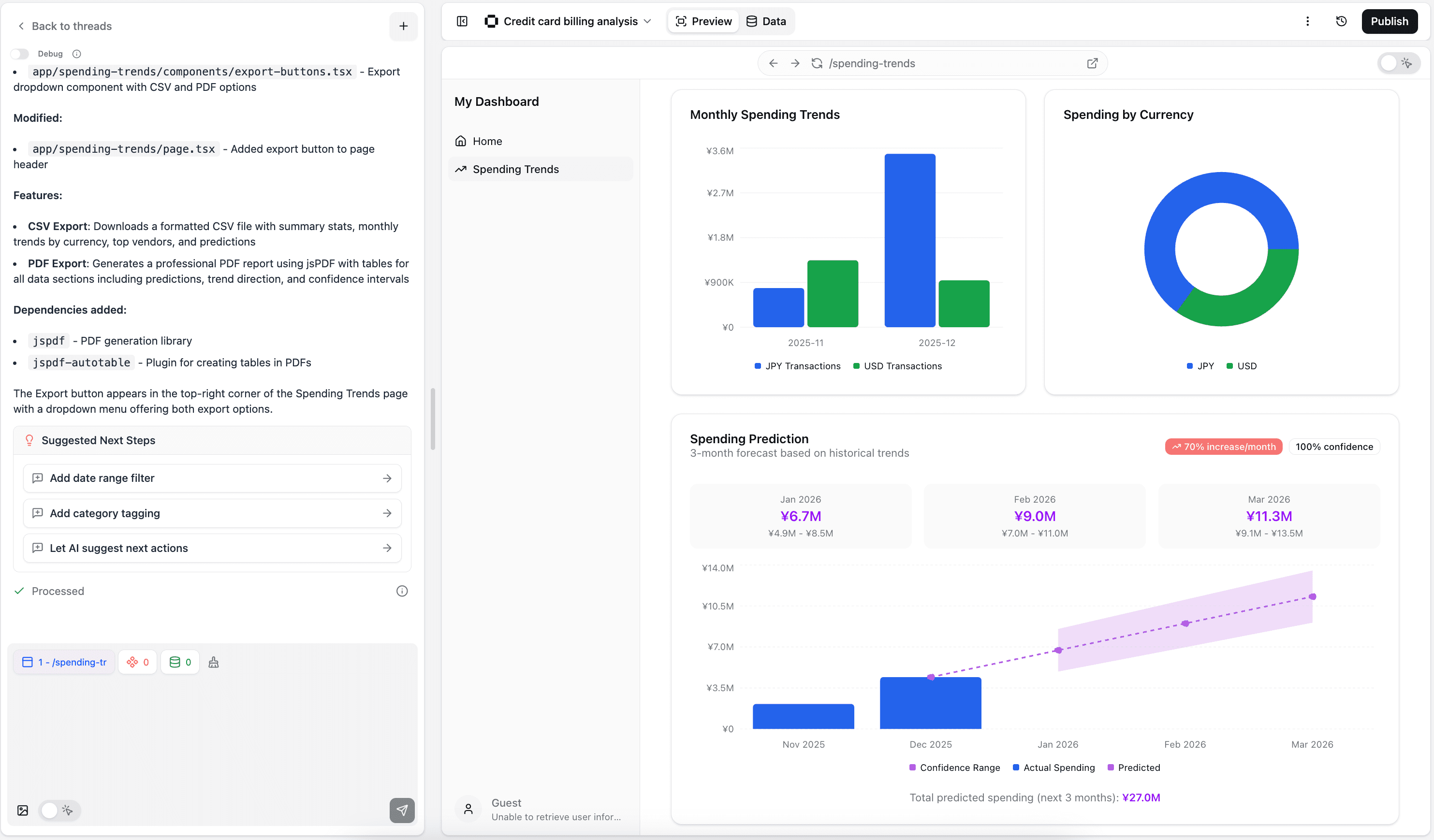
Squadbase brings the Vibe Coding BI approach to dashboards. You don't write code or drag widgets.
Instead, you describe what you want. AI builds it. You refine through conversation.
The goal: go from question to shareable AI dashboard in minutes, not days.
How It Works
Squadbase offers seamless integration with Snowflake through its data integrations. Connect your data and start a conversation. Describe the dashboard you need: "Show me a sales dashboard with monthly trends, top products, and regional breakdown."
Squadbase's AI dashboard builder generates the complete dashboard. Charts, filters, layouts - all created from your description. Squadbase AI handles everything from data queries to visual design.
Don't like something? Just say so. "Make the trend chart larger." "Add a filter for product category."
When you're happy, click publish. Only invited members can access it.
Strengths
- Always fresh data: Open the dashboard URL, see the latest numbers. No need to rebuild.
- Consistent logic: Queries are saved. The whole team sees the same calculations.
- Fastest time to sharing: Go from idea to shared dashboard in minutes
- No coding needed: Pure conversation-driven building
- Iterative refinement: Keep tweaking through chat
- Lower barrier: Business users can create without technical skills
Limitations
- Requires organizational rule development: While analyses can be created rapidly, team governance becomes essential
- All modifications through AI: Even small changes like text edits require conversation with AI
Squadbase is ideal for teams that prioritize speed and sharing. It's best when you need to get insights in front of people quickly. Think of it as the fastest path from data to decision.
Snowflake Intelligence - AI Chat for Your Data
What It Is
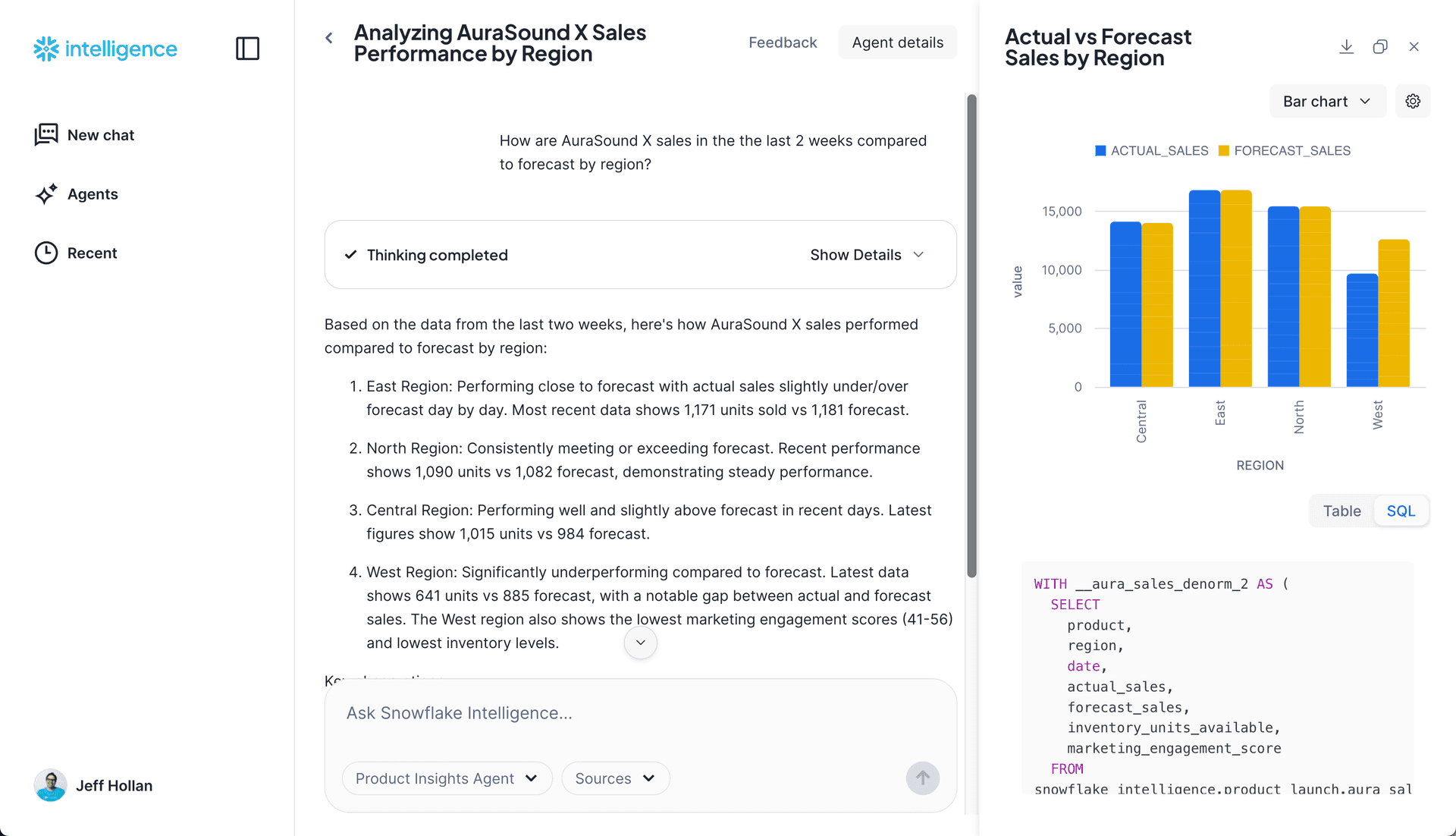
Snowflake Intelligence is Snowflake AI's native feature for AI data analysis. Snowflake announced it at Summit 2025. It became generally available in November 2025. Think of it as a platform for building ChatGPT-like AI agents for your team.
As Snowflake describes it, Snowflake Intelligence is "an enterprise intelligence agent that puts insights at every user's fingertips."
How It Works
Intelligence is powered by two core Snowflake Cortex technologies: Snowflake Cortex Agent and Snowflake Cortex Search.
Cortex Agent handles structured data queries. Ask "Show me monthly revenue trends," and the agent generates the SQL query for you.
But here's the catch: Cortex Analyst only works with tables that have a Snowflake semantic view defined. Without it, the agent cannot query your data.
Cortex Search handles unstructured data. Snowflake Intelligence works with different types of data: structured tables via Cortex Agent and unstructured content via Cortex Search. If your team needs to search PDFs, documents, or text files, you create a Cortex Search Service. No semantic model required for this path.
Setup Requirements
This is where Snowflake Intelligence differs from the other tools. Before your team can ask questions, someone must build a semantic layer:
- Semantic Views - Define your data models and business logic in SQL-like syntax. This tells the AI how to interpret terms like "active users" or "monthly revenue." Snowflake now offers Autopilot to generate a starting point, but you still need to review it.
- Cortex Search Service - For document search, you create and configure a search service.
- Agent Configuration - Register your semantic views and search services as tools for the agent.
If your organization already has well-defined Snowflake assets, setup is faster. If you're starting fresh without data engineers, expect significant upfront work.
Strengths
- Build once, share widely: Create a chat agent that the whole team can use
- Handles both structured and unstructured data: SQL tables via Cortex Agent, documents via Cortex Search
- Security built-in: Uses your existing Snowflake permissions
- No context switching: Users stay in the Snowflake platform they already know
- Autopilot assistance: AI helps generate semantic model drafts
Limitations
- Data engineer required for setup: Building semantic views is a prerequisite
- Each question starts fresh: No saved reports, and AI may interpret the same question differently
- Snowflake-only sharing: Results stay within the Snowflake ecosystem
Intelligence shines when you have data engineers who can set up semantic views. Once configured, business users get a powerful chat interface. But the setup cost is real.
Snowflake's official blog puts it this way: Intelligence helps users ask "why" and get trusted answers from their data - without static dashboards.
Sigma Computing - Co-pilot for Analytics
What It Is
Sigma Computing is an AI analytics tool that connects to Snowflake. Think of it as GitHub Copilot for business intelligence AI. AI suggests and assists, but you stay in control.
The Fall 2025 product launch added major upgrades to Sigma's AI features.
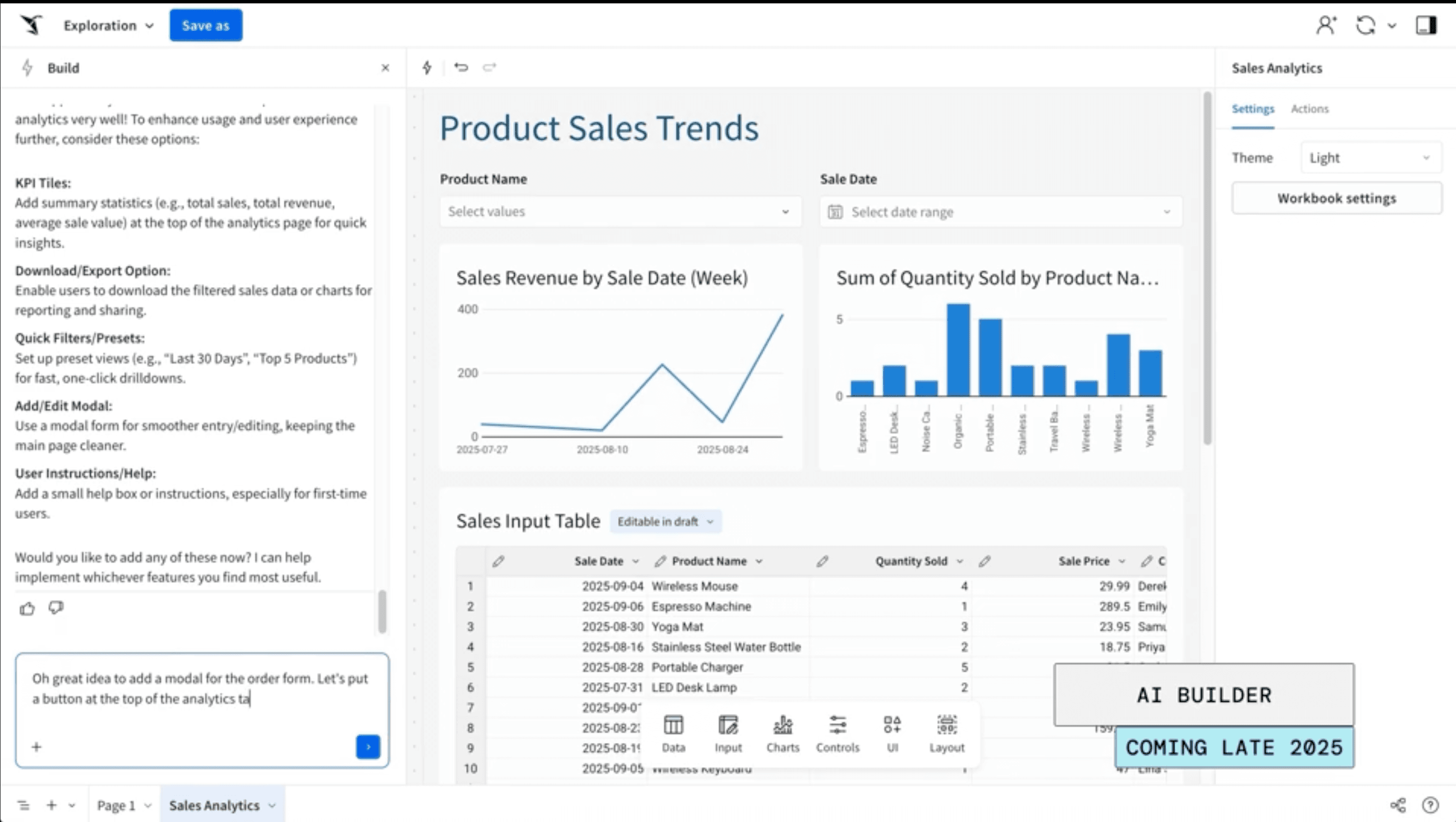
Sigma uses a spreadsheet-like interface. This feels familiar to business users. The AI layer adds natural language queries and automated insights for Snowflake data analysis.
Reference:
How It Works
Connect Sigma to your Snowflake account and open a workbook. With Ask Sigma, you can chat with AI to create charts using Visualization AI, write formulas, and explain data patterns. AI Builder feature transforms ideas into "governed, enterprise-ready workbooks" in minutes. This is the copilot pattern in action. AI functions as a helper, not a black box. Since everything happens within Sigma's interface, controlling your analysis flow is easy.
Strengths
- Always fresh data: Open a workbook, see the latest numbers. No need to re-ask questions.
- Consistent logic: Sigma saves your formulas. Everyone sees the same calculations every time.
- Transparency: See exactly what the AI did and why
- Editable outputs: Modify any AI-generated formula or chart
- Familiar interface: Spreadsheet-like design requires less training
Limitations
- Learning curve: Must understand Sigma's spreadsheet interface to use it well
- Limited flexibility: Significant constraints on analysis logic freedom
Sigma fits teams that need to understand and verify their work. It rewards users who invest time in learning the platform.
How to Choose the Right Tool for Your Team
Choosing the right tool isn't about features. It's about your team's resources and how they prefer to work.
Question 1: Do you have data engineers?
This is the most important question. The answer determines which tool fits your team.
- No dedicated data team → Squadbase is the fastest path. Connect your database and start building through conversation. No technical users required.
- Yes, with Snowflake expertise → Snowflake AI tools like Snowflake Intelligence become viable. Your engineers can build semantic views and configure agents for the whole team.
- Some technical users → Sigma Computing works well. Connection setup is straightforward, and analysts can take over from there.
Question 2: What do you need most?
- Shareable dashboards fast → Squadbase
- A chat agent for the whole team → Snowflake Intelligence (after setup)
- Deep exploration with full control → Sigma Computing
Question 3: Who will use it?
- Business teams creating stakeholder updates → Squadbase
- Executives wanting instant facts → Snowflake Intelligence (once configured)
- Analysts building detailed reports → Sigma Computing
Question 4: How important is sharing?
- Broad audience, easy access → Squadbase offers the simplest sharing
- Internal Snowflake users only → Snowflake Intelligence works fine
- Team collaboration on reports → Sigma Computing enables deep teamwork
Question 5: Does your team need consistent metrics?
If multiple people need to see the same numbers calculated the same way, Snowflake Intelligence has a gap. Each chat query may interpret "monthly sales" or "active users" slightly differently.
Squadbase and Sigma solve this. Once you build a dashboard or report, you lock in the logic. Everyone who opens it sees the same calculation. This matters for teams that need a single source of truth.
Many teams use more than one tool. Squadbase and other Snowflake third party tools get insights to stakeholders fast. Intelligence powers team-wide chat (if you have the setup resources). Sigma handles deep dives.
They complement each other.
Consider starting with the tool that matches your most urgent need. Pick the one that helps your team make better business decisions today. You can always add others later as your requirements grow.