Toward an AI-Led Dashboard Building Experience

Traditional BI tools were designed as "answer machines." Users formulate questions, connect data sources, write queries, choose chart types, and assemble dashboards. Getting to an answer requires countless clicks and decisions. We questioned this assumption. What if the real need isn't an "answer machine" but a partner that explores questions with you? One that helps you think "what should I look at next?" as you examine your data, letting you test ideas the moment they occur to you. That kind of experience is what data work should actually feel like. With this update, Squadbase evolves from "a tool users operate" to "a partner where AI leads and users focus on thinking."

Automatic Database Creation from Excel/CSV
Just upload an Excel or CSV file, and Squadbase AI handles preprocessing, data cleansing, and database creation automatically. When decisions are needed—like resolving inconsistent formatting or table structure—AI asks you directly. This means dashboards with time-series data or regular updates can now be built by simply handing over a file.
AI-Powered Analysis Suggestions
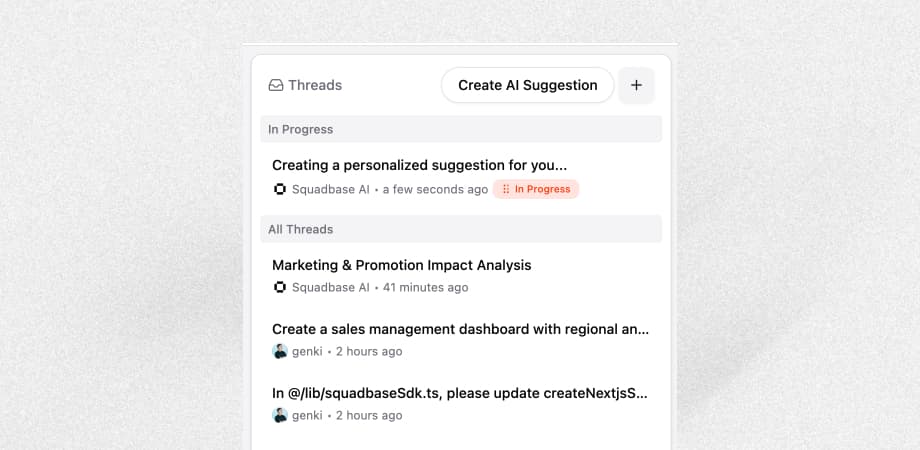
"What should I analyze next?"—this is a question BI tools have never answered. Click "Create AI Suggestion" in the thread list, and AI explores your data sources and existing dashboards to suggest what analysis to tackle next. Instead of staring at your data wondering where to start, the next step naturally emerges. That's what it means to explore data with AI.
Next Action Suggestions
After each completed task, Squadbase AI suggests what to do next. Start new tasks without typing a word, and try ideas you might never have thought of on your own.
With traditional BI, finishing one analysis often means stopping to think "now what?" With Squadbase, your flow of thought never breaks.
Threads
A thread list now appears at the top level of the chat area. Even with a conversation in progress, you can create a new thread to work on something else in parallel. Status badges let you see each thread's state at a glance. Dashboard building isn't a linear process. You run multiple ideas simultaneously and keep the ones that work. Threads support that kind of exploratory workflow.
Data Source Management
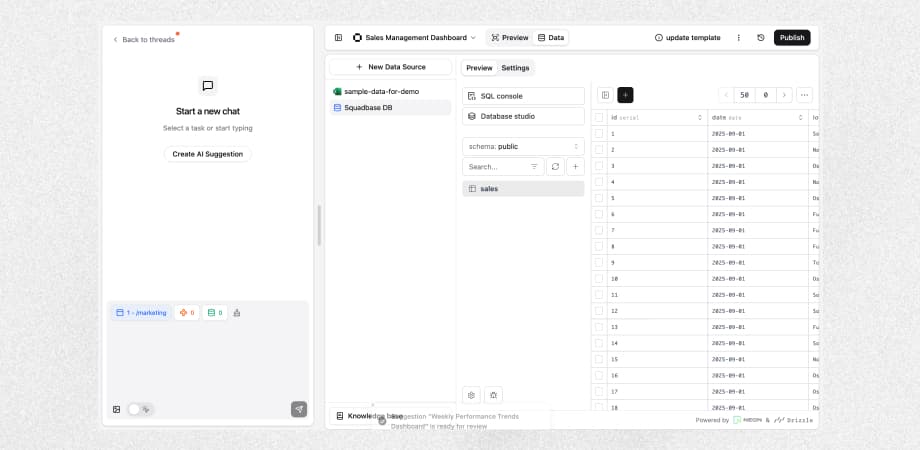
Managing data sources is unglamorous work, but it quietly eats up your time. The new Data Source Management tab gives you a clear view of all connected sources, making it easy to add new ones.
BI That Lets You Focus on Thinking
With this update, Squadbase is no longer just a dashboard building tool.
From data import to analysis ideation to next-action suggestions—AI leads the entire workflow. Instead of thinking about which button to click, you can focus on what insights your data might reveal.
This is what we believe BI should become.
What You Can Do Now
- Build dashboards directly from Excel/CSV — Let AI handle cleansing and preprocessing
- Receive analysis suggestions from AI — Move forward without wondering what to analyze next
- Work on multiple tasks in parallel — Try new ideas without waiting for one task to finish
- Manage data sources in one place — Build efficiently while monitoring connection status
Try It Now
Log in to Squadbase and experience what it's like to explore data with AI.